

Why Retailers Reject Your EDI 856 ASN (and How to Fix It)
Written by EDI Support LLC Team with 100+ Years of Cumulative EDI Experience
Published October 2026
Why Retailers Reject Your EDI 856 ASN (and How to Fix It)
Written by EDI Support LLC Team with 100+ Years of Cumulative EDI Experience
Published October 2026
Key Takeaways
- Correct the ASN, don’t resend a copy. Fix the actual problem before you send it again, or the same rejection comes right back.
- Most ASN rejections come from mismatches. The ASN must match the purchase order, the boxes on the truck, and the carton labels. Build it from what you shipped, not from what was ordered.
- Timing counts as much as accuracy. A correct ASN that arrives late is still non-compliant. Amazon, for example, wants it within 30 minutes of the truck leaving or at least 6 hours before the delivery appointment, whichever comes first.
An EDI 856 Advance Ship Notice (ASN) is the electronic document a supplier sends a retailer after a shipment leaves the dock and before it arrives, listing what’s on the truck down to the carton and its SSCC label. (For the full format, see our complete EDI 856 guide.) Retailers reject an ASN when it arrives late, doesn’t match the purchase order or the physical shipment, or breaks the rules in their implementation guide.
The causes are predictable, and almost every 856 rejection can be caught before the ASN goes out.
The 10 most common reasons retailers reject an ASN:
- It was sent late or never arrived.
- It doesn’t match the purchase order.
- Quantities don’t match what shipped.
- SSCCs are missing, invalid, duplicated, or don’t match the labels.
- The hierarchy, pack structure, or X12 version is wrong.
- Ship-to, DC, or store numbers are wrong.
- Ship or delivery dates are wrong.
- The shipment ID (BSN02) was reused.
- Carrier, SCAC, BOL, or PRO details are wrong or missing.
Nobody checked the 997 or 824 that came back.
First, Figure Out What Kind of Rejection You Have
“Rejected” can mean four different things, and each one points to a different fix.
What you got | What it means | Where to look |
A 997 (or 999) marked rejected | The file failed syntax checks and wasn’t processed | Your map or translator: envelope IDs, required segments, formats |
A 997 accepted, then an 824 Application Advice | The file was readable, but the content failed the retailer’s business rules | The data: PO, items, locations, SSCCs |
A defect in the retailer’s portal or scorecard | The retailer logged a compliance violation against the shipment | Timing, or a mismatch at receiving |
A chargeback or deduction weeks later | The ASN was accepted but didn’t match what arrived, or arrived late | Compare the ASN you sent to what shipped and when |
A clean EDI 997 is not proof the ASN was accepted. Walmart’s 856 guide, for example, says it returns a 997 for EDI compliance and a separate 824 when its receiving or traffic systems find errors (Walmart 856 guide).
The Parts of the ASN That Cause Most Rejections
You don’t need to know every segment to fix a rejection. EDI 856 is built as a hierarchy (Shipment > Order > Tare > Pack > Item), and most problems come from a handful of fields. For a segment-by-segment breakdown and a sample 856 file, see the EDI 856 reference guide on ihateedi.com.
Field | What goes wrong |
BSN02 (shipment ID) | Reused on a later shipment |
HL (hierarchy) | Wrong structure or broken parent links |
PRF (PO number) | Typo, old PO version, closed PO |
SN1 (quantity shipped) | Copied from the PO instead of the pack |
MAN (SSCC) | Doesn’t match the GS1-128 label |
N1 (ship-to) | Wrong DC or store number |
TD5 / REF (carrier, BOL, PRO) | Wrong SCAC, missing BOL or PRO |
DTM (dates) | Order date used as ship date |
Why Retailers Reject ASNs: The 10 Causes and Fixes
1. The ASN was late or never arrived
Cause: Sent manually at the end of day, a batch job running late, or a connection failure.
What the retailer sees: A truck at the dock with nothing to scan against. Amazon’s Vendor Shipment Prep and Transportation Manual says ASNs must be sent within 30 minutes of departure from the vendor warehouse or distribution center, or at least 6 hours before the carrier appointment at the Amazon destination, whichever is sooner, and that a shipment received without an on-time or accurate ASN is subject to chargebacks (Amazon manual, section 5.2). Walmart logs a missing ASN as an “ASN Not Downloaded” defect, which SPS Commerce reports is usually a timing issue (SPS Commerce).
Fix: Trigger the ASN from ship confirmation, and alert on any shipment that leaves without one.
2. The ASN doesn’t match the purchase order
Cause: A mistyped PO number, an outdated PO version, items that weren’t ordered, an item the retailer hasn’t set up, or a PO left off a multi-PO shipment.
What the retailer sees: An ASN that can’t be tied to an open order. This is a common 824 error. Amazon’s manual says an ASN must provide details for all POs included on a shipment (section 4.10).
Fix: Pull PO numbers and line items straight from the EDI 850, process PO changes before shipping, and set up every UPC/GTIN with the retailer before the first shipment.
3. Quantities don’t match what shipped
Cause: The ASN was built from the order or pick list, not the final pack. If 500 were ordered and 498 shipped, the ASN must say 498. Walmart’s 856 guide names building the ASN from what was picked, rather than what actually shipped, as a common cause of inaccurate ASNs.
What the retailer sees: Carton scans that don’t add up, and an invoice that won’t match the receipt. Amazon’s manual notes that overstated quantities can lead to chargebacks (section 5.3).
Fix: Generate the ASN from ship-confirm data and regenerate it if anything changes before it’s sent.
4. Missing, invalid, or duplicate SSCCs
Cause: Labels and the ASN come from different systems, labels get reprinted with new numbers, check digits are wrong, or an SSCC gets reused. (An SSCC is the 18-digit number in the GS1-128 barcode that identifies one carton or pallet. GS1 US)
What the retailer sees: A carton that scans and matches nothing, so it’s handled manually.
Fix: Create each SSCC once, from one source, and use that same number on the label and in the MAN segment. Never reuse one. If a label is reprinted, reprint the same number.
5. Wrong hierarchy, pack structure, or version
Cause: Standard pack sent where pick and pack is expected (or the reverse), a missing pallet level, broken HL parent IDs, or the wrong X12 version. Amazon, for example, has used X12 5010 for 856 ASNs since July 1, 2014 (section 5.8).
What the retailer sees: A file their system can’t place. It may pass simple tests and fail on mixed pallets or multi-PO loads.
Fix: Map the structure and version the retailer’s guide specifies (our EDI 856 guide explains how the hierarchy works), and test edge cases before go-live: multi-PO trucks, mixed cartons, partial shipments. See our EDI testing guide.
6. Invalid or missing ship-to, DC, or store numbers
Cause: The ship-to location doesn’t match the PO, the wrong qualifier is used, or a required mark-for store is missing.
What the retailer sees: Freight headed to one building that the ASN says belongs to another, or cartons that can’t be routed to stores after cross-docking.
Fix: Carry location numbers from EDI 850 into EDI 856 instead of keying them in.
7. Wrong dates
Cause: The ship date is the order date or the date the ASN was created, or the estimated delivery date is blank or unrealistic.
What the retailer sees: A shipment that looks future-dated or overdue, which can fail validation or throw off dock scheduling.
Fix: Use the actual departure date and the carrier’s real transit time.
8. Reused shipment ID (BSN02)
Cause: A counter that resets, or a correction sent without the purpose code the retailer expects.
What the retailer sees: A duplicate. Depending on the retailer, it’s rejected or it overwrites the earlier ASN.
Fix: One unique BSN02 per shipment and follow the retailer’s correction process exactly (see “How to correct and resend” below).
9. Carrier, SCAC, BOL, or PRO problems
Cause: The wrong SCAC, a carrier the routing guide didn’t assign, or a missing or mismatched bill of lading or PRO number.
What the retailer sees: An ASN they can’t match the inbound appointment or the carrier’s records. Amazon’s manual says the ASN must reference the PRO number and BOL number for all shipments, plus the ARN (Amazon Reference Number) for Collect shipments (section 4.10). It lists SCAC as mandatory and says an invalid or missing PRO can lead to chargebacks (section 5.3).
Fix: Pull SCAC, BOL, and PRO from your shipping system or the carrier booking and get the PRO from the carrier before the ASN goes out.
10. Nobody watched EDI 997 or EDI 824
Cause: The ASN went out and everyone assumed it landed.
What the retailer sees: No ASN, or a flagged ASN that never got fixed. Walmart’s guide asks suppliers to correct and resend within 24 hours of receiving an 824 [verify against current Retail Link guide].
Fix: Alert on missing or rejected 997s, treat 824s as same-day work, and keep each ASN and its 997. You’ll need them to dispute a charge.
How to Correct and Resend a Rejected ASN
- Read the response. A rejected 997 points to syntax or mapping. An EDI 824 names the business rule that failed. A chargeback notice names the violation.
- Fix the source, not just the file. If the quantity was wrong because the ASN came from the PO, correcting one ASN won’t stop the next one.
- Use the retailer’s correction method. Some accept a replacement ASN with the same shipment ID and a replace purpose code. Others want a cancel and a new ASN.
Amazon’s manual says ASNs can’t be deleted or canceled but can be edited for 7 days from submission or until the shipment arrives at the fulfillment center, whichever is sooner, either by EDI 856 or in Vendor Central (section 5.6). - Beat the truck. A corrected ASN is most useful before the shipment is received.
- Confirm the new 997 and watch for another 824.
What an ASN Rejection Costs
- Retailers list ASN violations and fees in their vendor compliance manuals. Amounts vary and change, so check your retailer’s current manual.
- Slower receiving. Freight that has to be counted by hand sits on the dock longer.
- Payment friction. Short-pays and deductions when the invoice won’t match the receipt.
- Scorecard damage with the buyer from repeated defects.
- Staff time spent researching and disputing deductions.
More on enforcement in our session on how to avoid chargebacks and penalties from retailers.
ASN Prevention Checklist
Before go-live
- Get the retailer’s current 856 guide and compliance manual.
- Confirm the required pack structure, HL levels, and X12 version.
- License a GS1 Company Prefix and get label layouts approved if required.
- Set up every item with the retailer.
- Test multi-PO, partial, mixed-carton, and multi-pallet shipments.
- Record the ASN timing window and correction process.
Every shipment
- Build the ASN from ship-confirm data.
- Use a unique BSN02.
- Match every SSCC to a physical label, with no reuse.
- Check PO, items, quantities, and ship-to against the 850.
- Check SCAC, BOL, and PRO against the carrier booking.
- Use the actual ship date.
- Send within the window, then confirm the 997 and watch for 824s.
Every month
- Review deductions by reason code and trace each one to a root cause.
- Check for updated retailer guides.
How Elevate Handles Your 856 ASN
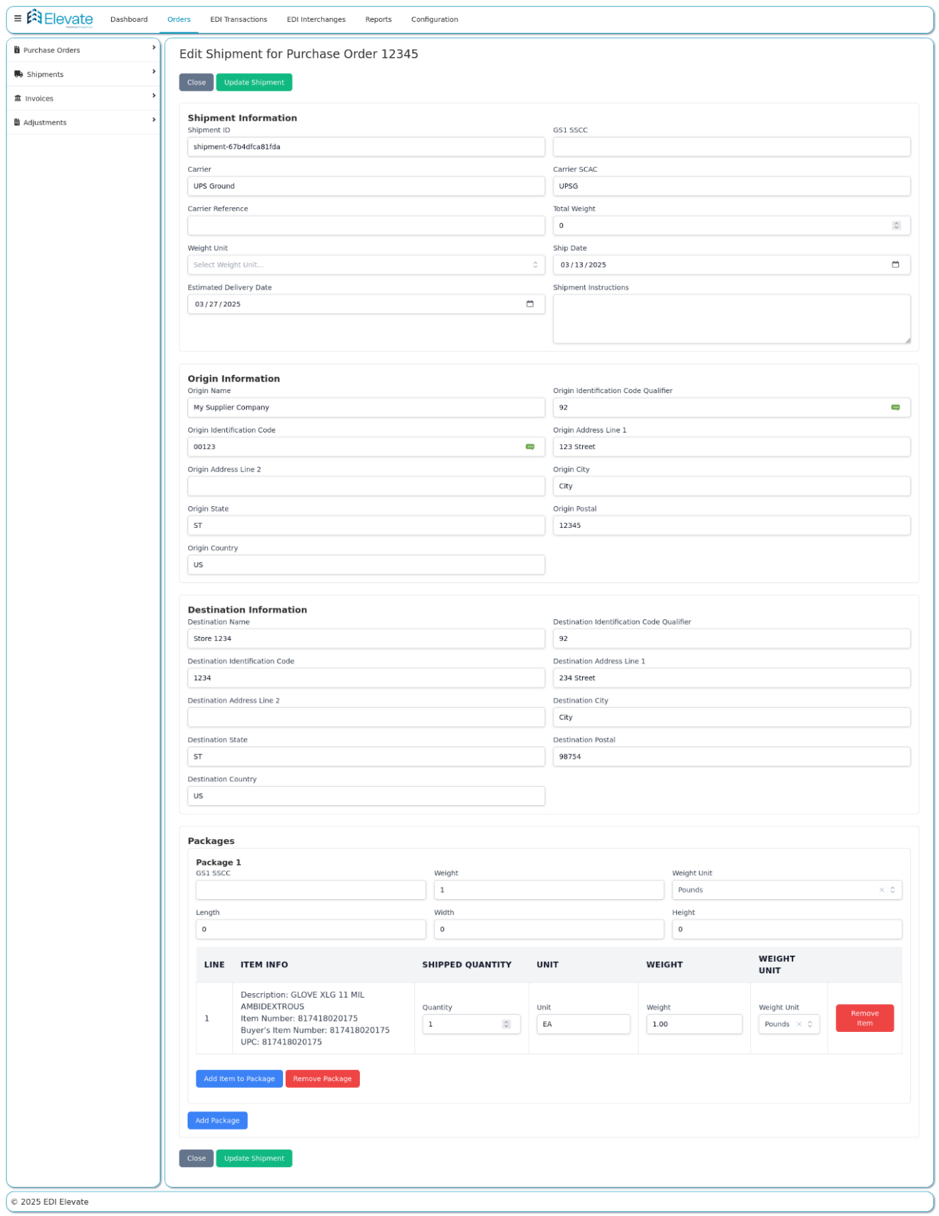
856 Advance Ship Notice in Elevate
How Elevate handles your ASN depends on whether it’s connected to your ERP or WMS. Either way, you hear about a problem as soon as the retailer flags it.
If Elevate is integrated with your ERP or WMS
Elevate builds and sends the ASN for you:
- It pulls your shipment data from your ERP, WMS, or a file.
- It checks that data against the PO and the retailer’s rules before anything goes out: quantities, ship-to and store numbers, dates, and SSCCs.
- It builds the 856 in that retailer’s required structure and version, and prints GS1-128 labels that match it.
- It sends the ASN on time and watches for the retailer’s 997 and any 824.
- It flags problems right away, so you can correct and resend before a chargeback.
If you’re not integrated
You create and send the ASN yourself in Elevate. You still get the same safety net once it goes out.
Alerts on every ASN, integrated or not
Elevate watches for three signs that something went wrong:
- A rejected 997: the retailer couldn’t accept the file.
- An 824 Application Advice: the file came through, but the retailer found errors in the content.
- An 864 Text Message: the retailer sent a notice about your documents.
When any of these comes in, Elevate automatically emails you and our support team. You find out the same day instead of when the chargeback shows up, and our team can start helping you fix it.
One honest limit: software can’t fix a wrong pick. If the wrong item goes in a box, the ASN will describe the wrong box. Elevate makes sure the ASN matches your shipment data and the retailer’s rules. Accurate packing still happens in your warehouse.
Setting up a specific retailer? See Walmart, Target, Home Depot, Lowe’s, Kroger, our onboarding guide, or pricing.
Already seeing ASN rejections? Thinking about switching EDI providers?
Elevate handles 856 mapping, labels, testing, and acknowledgment monitoring for you. We’ll look at what’s causing your rejections and show you what moving to Elevate would involve.
FAQs
Most ASN rejections come from timing or mismatches: the ASN arrives late, or its PO, quantities, SSCCs, or ship-to don’t match the order or the freight. Walmart’s 856 guide names building the ASN from picked quantities, rather than what shipped, as a common cause of inaccurate ASN data.
A 997 only confirms the ASN arrived and passed syntax checks. Retailers that use the 824 Application Advice send it when the content fails their business rules, such as an unknown item, an invalid location, or a PO mismatch. Watch for both.
Read the error to find the field that failed, fix the data at its source, and send a corrected ASN using the retailer’s correction method, ideally before the shipment arrives. Then confirm the new 997 and check that no new 824 comes back.
Usually, but each retailer has its own process. Some accept a replacement with the same shipment ID and a replacement purpose code. Others require a cancellation and a new ASN. Amazon’s manual says ASNs can’t be deleted or canceled but can be edited for 7 days from submission or until the shipment arrives, whichever is sooner.
The retailer has nothing to receive against, so freight is handled manually and the shipment is usually flagged for a compliance chargeback or defect. Amazon’s manual, for example, requires the ASN within 30 minutes of departure or at least 6 hours before the carrier appointment, whichever is sooner, and says shipments without an on-time or accurate ASN are subject to chargebacks.
Usually because labels and the ASN are generated from different data, or labels were reprinted with new numbers after the ASN was built. Generate each SSCC once and use the same number on the GS1-128 label and in the ASN’s MAN segment.
The freight can be right while the ASN is wrong. A late ASN, a label mismatch, a wrong ship-to, or a quantity copied from the PO can each trigger a chargeback on a perfect shipment. Compare the ASN you sent, its 997, and any 824 against the retailer’s deduction reason to find the cause.
Often, yes, through the retailer’s dispute process. You’ll need proof the ASN was correct and on time: a copy of the ASN, its shipment ID (BSN02), and the 997 showing when the retailer received it. Keep these records for every shipment.