

Key Takeaways
- Acumatica EDI integration connects Acumatica Cloud ERP to your trading partners through an EDI provider that sits between the two systems, translating EDI documents and pushing/pulling data via Acumatica’s REST API.
- Acumatica does not include a built-in EDI translator. It provides the REST API and Generic Inquiry framework; a dedicated EDI platform handles trading partner connectivity (AS2, SFTP, VAN), X12 translation, and the API connection itself.
- The core documents map directly to Acumatica records: EDI 850 becomes a Sales Order, EDI 856 is generated from a Shipment, EDI 810 is generated from an AR Invoice, and EDI 855, 997, and 846 round out most setups.
- The biggest factor in implementation speed is data mapping like item cross-references, units of measure, custom fields, ship-to/bill-to structure, and (if applicable) subsidiary configuration.
- Typical implementation runs 3–6 weeks from kickoff to first trading partner live, depending on trading partner complexity and how clean the underlying Acumatica data already is.
- Elevate provides for Acumatica EDI integration as a fully managed service: EDI translation, trading partner connectivity, Acumatica API integration, mapping, testing, and ongoing support included as one offering.
Quick Answer: What Is Acumatica EDI Integration?
Acumatica EDI integration is the automated connection between Acumatica Cloud ERP and a company’s trading partners (retailers, distributors, and 3PLs) through an EDI provider that sits between the two systems. The EDI provider receives EDI documents such as purchase orders (850) from trading partners, translates them into a format Acumatica understands, and creates the corresponding records like sales orders, shipments, invoices inside Acumatica using Acumatica’s REST API. The same process runs in reverse: when an order is shipped or invoiced inside Acumatica, the EDI provider pulls that data out, converts it into the correct EDI format (856, 810), and transmits it back to the trading partner.
The result is that purchase orders, shipment notices, invoices, and acknowledgments move between a company’s trading partners and its ERP without anyone re-typing data into a portal or spreadsheet.
The rest of this guide breaks down exactly how that connection works, which documents are involved, what has to be configured before go-live, how long it takes, and what to expect from a fully managed provider like Elevate.
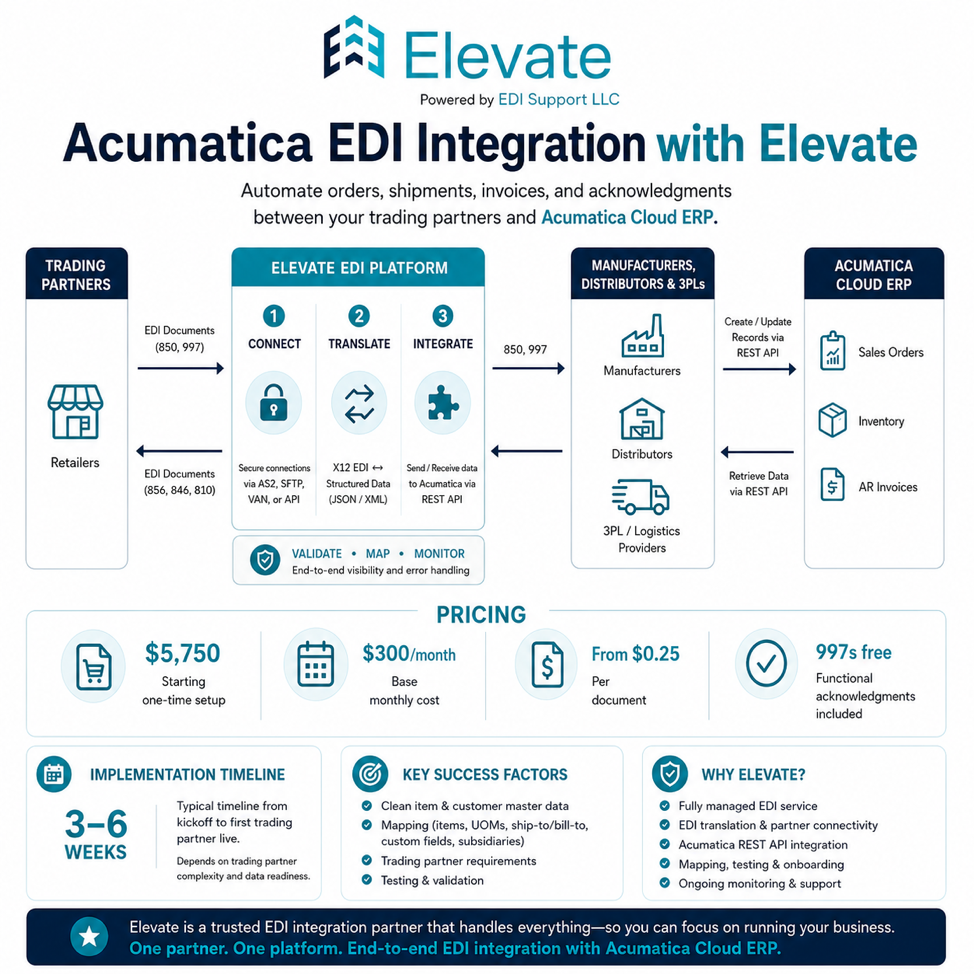
Elevate’s EDI Integration with Acumatica Cloud ERP
Already know you want this for your business?
See supported documents, our onboarding process, and how to get started.
What Problem Does Acumatica EDI Integration Actually Solve?
Most small and mid-sized businesses don’t start with an integrated EDI setup. They start with what’s sometimes called our “non-integrated” or “portal-based” EDI: a trading partner sends a purchase order, it lands in Elevate’s EDI web portal or inbox, and someone on your team manually re-keys that order into Acumatica. When the order ships, that same person manually creates the ASN and invoice in Elevate based on what happened in Acumatica.
This works for a handful of orders a month. It becomes a liability once a business is:
- Processing enough order volume that manual entry creates a real labor cost
- Working with multiple trading partners, each with slightly different requirements
- Experiencing errors from manual re-entry — wrong item numbers, quantities, or ship-to addresses
- Missing ASN timing windows because someone forgot to create the shipment notice
- Unable to see, in real time, whether an order made it from the trading partner into the ERP correctly
Acumatica EDI integration removes the manual re-entry step entirely. Orders flow directly into Acumatica as sales orders. Shipment and invoice data flow directly out of Acumatica as EDI documents. The business operates inside Acumatica the way it always has and the EDI layer becomes invisible infrastructure rather than a second system someone has to manage.
How Does Acumatica EDI Integration Work? (Technical Overview)
At a high level, an Acumatica EDI integration has three layers working together. Understanding these layers makes it much easier to understand what an EDI provider is actually doing behind the scenes.
Layer 1: Trading Partner Connectivity
This is the communication layer between the EDI provider and the trading partner (Walmart, Target, Amazon Vendor Central, a distributor, a 3PL, etc.). Documents move over one of a few standard protocols:
- AS2 — a secure, direct connection commonly required by large retailers
- SFTP — secure file transfer, common with distributors and many mid-size partners
- VAN (Value Added Network) — a third-party mailbox that routes documents between multiple trading partners
- API — a newer, growing option for some marketplaces and partners
Whichever method is required, this is where raw EDI files (X12 documents like an 850 or 856) physically arrive and depart.
Layer 2: EDI Translation
Raw X12 EDI documents are not human-readable and are not in a format Acumatica can use directly. The EDI translation layer parses the X12 file, validates it against the trading partner’s implementation guide (segment requirements, qualifiers, codes), and converts it into a structured format typically JSON or XML that maps cleanly to Acumatica’s data structure.
This layer also runs in reverse for outbound documents: it takes structured data exported from Acumatica and builds a properly formatted X12 file that matches the trading partner’s exact specification, including their specific qualifiers, segment order, and required references.
Layer 3: Acumatica ERP Integration (the API Connection)
This is the layer that actually talks to Acumatica. Acumatica Cloud ERP exposes a contract-based REST API that allows external systems to create, read, update, and delete records in sales orders, purchase orders, shipments, AR invoices, stock items, customers, and more using standard HTTP requests and JSON payloads.
For inbound documents, the EDI provider’s middleware sends a request to Acumatica’s REST API to create a new record (for example, posting a new Sales Order when an 850 Purchase Order arrives).
For outbound documents, the EDI provider needs a way to know when something in Acumatica is ready to go out. For example, when a shipment has been confirmed and an ASN needs to be sent. This is typically handled through one of two methods:
- Scheduled polling — the integration checks Acumatica on a set interval (e.g., every few minutes) for new or updated records that meet specific criteria, often using a Generic Inquiry built specifically to surface “ready to send” transactions
- Event-based triggers — Acumatica’s Business Events feature can fire when a record changes status (e.g., a shipment is confirmed), kicking off the export process automatically
Either way, once the data is retrieved from Acumatica, it flows back through the translation layer (Layer 2) and out through the connectivity layer (Layer 1) to the trading partner.
Put simply: the trading partner speaks EDI/X12, Acumatica speaks REST API/JSON, and the EDI provider is the translator sitting in the middle, fluent in both.
Does Acumatica Have Built-In EDI?
Acumatica itself does not include a full EDI translator or trading-partner connectivity as a core, out-of-the-box module. What Acumatica provides is the REST API and Generic Inquiry framework that makes integration possible. It is the “plumbing” that an EDI provider connects to. The actual EDI translation (X12 parsing, trading partner compliance, AS2/SFTP/VAN connectivity, mapping qualifiers and codes) is handled by a dedicated EDI platform that integrates with Acumatica through that API.
This is why “Acumatica EDI integration” almost always refers to a third-party EDI provider connecting to Acumatica via API, rather than a feature you simply turn on inside Acumatica.
Do I Have to Use the Same EDI Provider as My Trading Partners?
No, and this is one of the most common points of confusion for businesses setting up Acumatica EDI integration for the first time. EDI is built on standardized document formats (X12 in the US), so it works more like a shared language than a closed network. As long as your EDI provider can translate your Acumatica data into the exact format, codes, and qualifiers a specific trading partner requires, it doesn’t matter what platform that trading partner uses on their end.
In practice, this means if your retailer runs on SPS Commerce internally, they do not require you to also use SPS Commerce. Your EDI provider exchanges properly formatted X12 documents with that retailer’s EDI system, directly or through a VAN, the same way two people can correspond by mail even if they use different mail carriers.
Supported EDI Documents and Their Acumatica Equivalents
The table below shows the most common EDI transaction sets used by small and mid-sized businesses on Acumatica, the direction they travel, and what they typically become (or come from) inside Acumatica.
EDI Document | Direction | What It Is | Acumatica Equivalent |
EDI 850 | Inbound (Trading Partner → Acumatica) | Purchase Order | Creates a new Sales Order |
EDI 855 | Outbound (Acumatica → Trading Partner) | Purchase Order Acknowledgment | Generated from the Sales Order status (accepted, changed, rejected) |
EDI 856 | Outbound (Acumatica → Trading Partner) | Advance Ship Notice (ASN) | Generated from a confirmed Shipment, including carton, tracking, and item detail |
EDI 810 | Outbound (Acumatica → Trading Partner) | Invoice | Generated from an AR Invoice |
EDI 997 | Both directions | Functional Acknowledgment | Confirms receipt of a document at the syntax level — handled at the EDI translation layer, not tied to a specific Acumatica record |
EDI 846 | Outbound (Acumatica → Trading Partner) | Inventory Inquiry/Advice | Generated from Stock Item quantities, often used for vendor-managed inventory or marketplace listings
|
EDI 940 / 945 | Both directions | Warehouse Shipping Order / Shipping Advice | Used when a 3PL or warehouse management system is involved in fulfillment alongside Acumatica |
Not every business needs every document. Most small businesses onboarding their first one or two trading partners are working primarily with 850, 856, 810, and 997, with 855 and 846 coming into play depending on the trading partner’s specific requirements.
A Step-by-Step Walkthrough: How an Order Moves Through Acumatica via EDI
To make this concrete, here is what actually happens, step by step, for a typical retail order once Acumatica EDI integration is live.
- The trading partner sends an EDI 850 Purchase Order: The retailer’s system transmits the 850 over AS2, SFTP, or VAN to the EDI provider.
- The EDI provider validates and translates the 850: The document is checked against the trading partner’s implementation guide with correct item identifiers, valid ship-to codes, required qualifiers and converted into structured data.
- The order is created in Acumatica as a Sales Order: Using the Acumatica REST API, the EDI provider creates a new Sales Order with the correct customer, items, quantities, pricing, and ship-to information already mapped to match Acumatica’s data structure.
- An EDI 997 confirms receipt, and an 855 may confirm acceptance: The 997 confirms the 850 was received and structurally valid. If the trading partner requires an 855 Purchase Order Acknowledgement, it’s generated based on whether the Sales Order was accepted as-is, changed, or rejected.
- The order is processed normally inside Acumatica: The warehouse or fulfillment team picks, packs, and ships the order exactly as they would for any other Acumatica sales order, no EDI-specific steps required on their end.
- The Shipment is confirmed in Acumatica. Once the shipment is confirmed with carton counts, weights, and tracking numbers entered as part of the normal shipping workflow, the EDI integration detects this update.
- The EDI provider generates and sends an EDI 856 Advance Ship Notice. Shipment data is pulled from Acumatica, converted into the trading partner’s required 856 format (including carton hierarchy if required), and transmitted before or at the time of shipment, per the partner’s timing rules.
- The AR Invoice is created in Acumatica. Whether this happens automatically from the shipment or as a separate billing step depends on the business’s workflow.
- The EDI provider generates and sends an EDI 810 Invoice. Invoice data like line items, pricing, references, terms is pulled from Acumatica and transmitted to the trading partner in their required 810 format.
- The cycle completes with acknowledgments. The trading partner returns a 997 confirming receipt of the 856 and 810.
From the perspective of the team running Acumatica, steps 1, 3, 6, and 8 are the only ones that touch on their day-to-day work and even those look like normal ERP activity. Everything EDI-specific happens in the background.
What Has to Be Configured Before Go-Live: Data Mapping
The single biggest factor in how smoothly an Acumatica EDI integration runs and how long it takes to implement is data mapping. This is the process of telling the integration exactly how trading partner data corresponds to data inside Acumatica. Mapping typically covers:
- Item identification: Trading partners refer to products by UPC, their own buyer item number, or a vendor item number which may or may not match the item ID used inside Acumatica. A cross-reference table needs to exist so an incoming 850 line item resolves to the correct Acumatica Stock Item.
- Units of measure: A trading partner might order in “cases” while Acumatica’s item master is set up in “each.” UOM conversions need to be configured so quantities and pricing translate correctly in both directions.
- Customer and ship-to/bill-to structure: Each trading partner and often each location or banner within that trading partner, needs to map to the correct customer record and ship-to/bill-to address in Acumatica.
- Custom fields: Many Acumatica instances have custom fields added for industry-specific or company-specific data (a specific reference number, a routing code, a compliance attribute). A well-built integration maps EDI data to these custom fields directly, rather than forcing a change to how the ERP is set up.
- Order types, warehouses, and numbering: Acumatica supports multiple order types, warehouses, and numbering sequences. EDI orders typically need to be routed to a specific order type or warehouse so they’re handled consistently and are easy to identify and report on.
- Subsidiaries and multiple companies: Acumatica’s multi-entity structure allows a single instance to host multiple companies or subsidiaries. If a business operates this way, EDI trading partner connections need to be configured per subsidiary, with transactions routed to the correct company.
- Pricing, tax, and charges: Allowances, charges, and any partner-specific pricing rules need to be accounted for so the 810 invoice the trading partner receives matches what they expect and matches what was actually shipped.
This mapping work is what most of the “configuration” phase of implementation actually consists of. The more consistent and clean the underlying Acumatica data already is (item masters, customer records, UOMs), the faster this phase moves.
Comparing Your Options for Connecting EDI to Acumatica
There isn’t one single way to connect EDI to Acumatica. Businesses generally choose between a few approaches, each with very different cost, effort, and ongoing maintenance profiles.
Approach | How It Works | Best Fit | Tradeoffs |
Manual / portal-based EDI (no integration) | Orders are viewed in an EDI web portal; staff manually re-enter orders into Acumatica and manually create ASNs/invoices on the EDI side | Businesses with very low order volume from one partner, just starting out | Time-consuming, error-prone, doesn’t scale, no real-time visibility |
DIY integration platforms (Celigo, Boomi, Workato, Jitterbit, MuleSoft) | A general-purpose integration/iPaaS tool is configured to connect an EDI translator’s output to Acumatica’s REST API | Companies with an internal developer or integration team who want full control | Powerful and flexible, but the business owns mapping logic, monitoring, error handling, and ongoing maintenance |
EDI provider with custom-built API connection | An EDI provider builds and maintains a direct, custom integration between their translation engine and your Acumatica instance | Growing businesses that want EDI and ERP integration handled as one service | Quality depends heavily on the provider’s experience with Acumatica specifically and how proactively they maintain the mapping |
Fully managed EDI + ERP integration (Elevate) | A fully managed provider handles trading partner connectivity, EDI translation, and the Acumatica API connection as one bundled service, including ongoing monitoring and support | SMBs and mid-market companies that want EDI to be “someone else’s job” | Requires working with a provider whose support and SLAs you trust, since they become your operational EDI layer |
For most small and mid-sized businesses without an internal EDI or integration team, the practical choice comes down to the last two rows. The deciding factor is usually how much ongoing support and accountability is included versus billed separately.
What's the Difference Between "Embedded" EDI and a Connected EDI Integration?
Some EDI providers offer what’s sometimes called embedded EDI, where the EDI screens and document queue are built directly into the Acumatica UI as an add-on module. With this approach, your team logs into Acumatica and sees EDI transactions in a dedicated tab alongside everything else.
A connected integration, the model described throughout this guide, keeps EDI translation and trading partner connectivity on the EDI provider’s own platform, and uses Acumatica’s REST API to push finished records (Sales Orders, Shipments, AR Invoices) into Acumatica automatically.
Both approaches aim to eliminate manual entry, and which one is “better” often comes down to preference and what a given provider supports. The practical difference is where the EDI-specific work happens and who’s keeping an eye on it. With an embedded module, someone on your team may still check an EDI screen inside Acumatica from time to time. With a fully managed, API-based integration like Elevate’s, the EDI provider monitors transactions on its own platform, and your team mostly just sees the resulting Sales Orders, Shipments, and Invoices inside Acumatica, the same as any other order.
How Does Elevate's Acumatica EDI Integration Work?
Elevate connects EDI directly to Acumatica Cloud ERP using the architecture described above. Elevate receives EDI documents from your trading partners, translates and validates them, and creates or updates the corresponding records in Acumatica through its REST API, then runs the same process in reverse for outbound documents.
What that looks like in practice:
Inbound: Trading Partner → Elevate (connectivity + translation) → Acumatica REST API → Sales Order (and related records)
Outbound: Acumatica (Shipment, AR Invoice, Stock Item data) → Elevate (extraction + translation) → Trading Partner
Supported documents include EDI 850 (Purchase Orders → Acumatica Sales Orders), EDI 855 (PO Acknowledgments), EDI 856 (Advance Ship Notices generated from fulfillment data), EDI 810 (Invoices from Acumatica AR), and EDI 846 (Inventory updates), all processing automatically based on how your business already works inside Acumatica.
Onboarding Process
Elevate’s onboarding for an Acumatica EDI integration follows four phases:
- Assessment: Elevate reviews each trading partner’s EDI requirements (documents, qualifiers, timing rules, communication method) alongside your current Acumatica setup: order types, item master structure, custom fields, and any existing EDI configuration.
- Configuration: EDI data is mapped to the correct Acumatica fields, item cross-references and UOM conversions are built, and each trading partner connection is configured for the required documents and communication protocol.
- End-to-End Testing: Transactions are validated all the way through, from the trading partner, into Elevate, into Acumatica, and back out to the trading partner again. This confirms that a test 850 creates a correct Sales Order, and that shipment and invoice data flows back out as a correct 856 and 810. Learn about our end-to-end EDI testing process.
- Go-Live Once testing is complete and the trading partner has signed off, transactions move into production with ongoing monitoring and support.
What makes this a “fully managed” integration
The setup, translation logic, validation rules, and ongoing support are included as part of the service, rather than separate line items you’d otherwise have to source from different vendors (an EDI translator, an integration consultant, and a support contract). When a trading partner updates their requirements, Elevate’s support team, who are already in regular contact with trading partners as part of day-to-day EDI operations, updates the EDI maps proactively and lets you know what changed. You may ask “what happens if my EDI fails at 9am on a Monday?” This is where Elevate makes the real difference for you and your team. Our technical support team is proactive and can answer your questions within 2 hours of you reaching out to them directly. For urgent inquiries, we offer a resolution time of 24 hours and for others 24-48 hours, all baked into your pricing.
Can We Test This Before It Touches Our Live Acumatica Data?
Absolutely, yes! We work with your Acumatica expert/implementation partner to test related
How Long Does Acumatica EDI Integration Take?
Typical implementation timelines run 3–6 weeks from kickoff to the first trading partner going live. What affects where a project falls in that range:
- Number of trading partners and documents involved: one partner with 850/856/810 moves faster than five partners, each with different requirements
- Custom fields and non-standard Acumatica configuration: more customization means more mapping work
- Data quality: clean item masters, consistent UOMs, and accurate customer/ship-to records speed up configuration significantly. Messy data is the most common source of delay
- Trading partner responsiveness: testing requires the trading partner to review and approve test transactions, and their response time is often outside the EDI provider’s control
- Whether the business is migrating from another EDI provider: migrations are typically phased, moving trading partners in batches so issues can be caught and corrected without disrupting live order flow
Larger projects, like onboarding many trading partners at once or integrating with multiple Acumatica subsidiaries, are usually broken into phases rather than attempted as a single go-live.
What Usually Goes Wrong With Acumatica EDI Integrations?
- Custom fields and non-standard configurations: Many Acumatica instances have been customized over time: added fields, modified order types, industry-specific attributes. A good integration maps directly to these fields rather than requiring changes to the ERP setup the business already relies on.
- Multiple subsidiaries or business entities: If a business runs multiple companies within one Acumatica instance, each trading partner connection needs to be configured for the correct subsidiary, with transactions routed and reported separately.
- ASN (856) complexity: The 856 is consistently the most detail-sensitive document because it depends on accurate carton hierarchy, tracking numbers, and shipment timing, all of which originate from warehouse or fulfillment activity rather than the EDI layer itself. Getting this right requires the shipment confirmation process in Acumatica to capture the right data in the first place.
- Item master inconsistencies: Duplicate SKUs, inconsistent units of measure, or missing cross-reference data between a trading partner’s item numbers and Acumatica’s item master are among the most common causes of failed or delayed transactions, and the most common reason testing takes longer than expected.
- Keeping up with trading partner changes: Retailers periodically update EDI specifications: new required fields, changed qualifiers, new ship-to codes. Without a process for catching these changes proactively, maps that worked at go-live can start failing months later.
How Much Does Acumatica EDI Integration Cost?
A realistic starting point for Acumatica EDI integration is around $5,750 to get your first trading partner connected, plus roughly $300 a month before transaction volume.
Costs for an Acumatica EDI integration generally fall into two buckets: a one-time setup cost to get connected, and an ongoing monthly cost to keep running.
Based on Elevate’s published pricing, here’s what a starting setup looks like for one trading partner connected to Acumatica via API, which is the model described throughout this guide:
| Cost Item | Amount | Type |
| Trading partner setup (mapping, testing, configuration) | $750 | One-time |
| Acumatica API integration setup | $5,000 | One-time |
| Total to get connected | $5,750 | One-time |
| EDI platform access | $50/month | Ongoing |
| Acumatica API integration maintenance | $250/month | Ongoing |
| Total base monthly | $300/month | Ongoing |
On top of the base monthly fee, transactions are billed per document, starting at $0.25 per document for the first 1,000 documents a month and stepping down as volume increases (997 acknowledgments are always free).
A few things that can move this number:
- Additional trading partners typically add $750 each for setup, though additional accounts under the same trading partner relationship (a second store banner on the same retailer’s EDI network, for example) are often priced closer to $250.
- Custom packing slips or UCC compliant labels, if a specific trading partner requires them, are $250 each as a one-time fee.
- Transaction volume is the main ongoing variable. At higher volumes, per-document pricing steps down (to as low as $0.05/document above 50,000 documents a month), so cost per transaction actually improves as you scale.
These figures are starting estimates based on Elevate’s pricing. Your actual quote depends on your specific trading partners, document volume, and any partner-specific requirements like packing slips or labels.
Do you want to see the pricing for your specific case?
Is Acumatica EDI Integration Right for My Business?
A good fit if your business:
- Is already running Acumatica Cloud ERP and processing EDI orders
- Currently uses a non-integrated (portal-based) EDI setup and is feeling the cost of manual entry
- Is growing and managing, or about to manage, multiple trading partners
- Is switching EDI providers and wants to bring Acumatica into that transition cleanly
- Processes enough EDI volume that manual handling has become a bottleneck or a source of errors
Probably not the priority yet if:
- You’re processing EDI for a single trading partner at very low volume, and manual entry, while not ideal, isn’t currently causing errors or delays
- Your Acumatica implementation itself is still in progress. Integration mapping is easier to do once the ERP setup (item master, customer records, order types) is stable
For businesses in that second group, starting with a non-integrated, fully managed EDI setup and adding the Acumatica integration once volume grows is often the more practical sequence.
Need help getting Acumatica connected to your EDI?
Elevate handles the EDI translation, trading partner connectivity, and Acumatica API integration as one fully managed service, including the ongoing support and proactive monitoring that keeps maps current as trading partner requirements change.
FAQs
Acumatica EDI integration is an automated connection between Acumatica Cloud ERP and a company’s trading partners, set up and operated by an EDI provider like Elevate. It uses Acumatica’s REST API to create records like sales orders, shipments, and invoices directly from EDI documents, and to send EDI documents based on activity that happens inside Acumatica, removing the need for manual data entry between an EDI portal and the ERP.
Elevate platform handles trading partner connectivity (AS2, SFTP, VAN) and EDI translation (X12 to structured data), then uses Acumatica’s contract-based REST API to create or update records such as Sales Orders, Shipments, and AR Invoices. Outbound documents are generated by extracting data from Acumatica, often via Generic Inquiries or Business Events, translating it into the trading partner’s required EDI format, and transmitting it.
EDI refers to the standardized document formats, like X12 850, 856, and 810, that trading partners require for exchanging business documents. API integration refers to the technical connection used to get data into and out of an ERP, in this case Acumatica’s REST API. An Acumatica EDI integration uses both: EDI formats to communicate with trading partners, and the Acumatica API to communicate with the ERP.
No. EDI is a standardized format, not a closed network tied to one vendor. As long as your provider can translate your data into the format and codes a trading partner requires, it doesn’t matter which EDI platform that trading partner uses on their own end.
No. Acumatica provides the REST API and Generic Inquiry framework that makes integration possible, but it doesn’t include a full EDI translator, trading-partner connectivity, or compliance mapping out of the box. Those are provided by a dedicated EDI platform that connects to Acumatica through its API.
The most common documents are EDI 850 (Purchase Orders, become Acumatica Sales Orders), EDI 855 (PO Acknowledgments), EDI 856 (Advance Ship Notices, generated from Shipments), EDI 810 (Invoices, generated from AR Invoices), EDI 997 (Functional Acknowledgments), and EDI 846 (Inventory updates). Some businesses also use 824/864 (error notifications) and 940/945 (warehouse shipping documents) depending on their trading partners and whether a 3PL is involved.
Yes. When fulfillment runs through a 3PL or WMS, EDI 940 (Warehouse Shipping Order) and 945 (Warehouse Shipping Advice) typically sit alongside the standard 850/856/810 set, coordinating between Acumatica, the EDI provider, and the warehouse system so shipment data still flows correctly into the 856 ASN sent to the trading partner.
Typical implementation runs 3–6 weeks from kickoff to the first trading partner going live, depending on the number of trading partners and documents, how customized the Acumatica instance is, the quality of existing item and customer data, and how quickly the trading partner responds during testing.
Based on Elevate’s published pricing, connecting one trading partner to Acumatica via API starts at around $5,750 in one-time setup costs ($750 for trading partner setup plus $5,000 for the API integration), plus roughly $300 a month in base platform and integration fees before transaction volume. Per-document transaction fees start at $0.25 and step down as volume increases, with 997 acknowledgments always free.
Yes. A well-built integration maps EDI data directly to custom fields that already exist in an Acumatica instance, so the business doesn’t need to change its ERP setup to accommodate EDI.
The EDI provider updates the relevant maps to reflect the new requirements and communicates the change to the business. Providers who are in regular contact with trading partners as part of normal EDI operations are typically able to catch these changes proactively, before they cause failed transactions.
Yes, when the integration is configured for it. Acumatica’s multi-entity structure allows multiple companies within one instance, and EDI trading partner connections can be set up per subsidiary, with transactions routed to the correct company.
With a portal-based (non-integrated) setup, EDI documents are viewed in a separate web portal and staff manually re-enter orders into Acumatica and manually create outbound documents based on what happens in the ERP. With an integration, Acumatica records (Sales Orders, Shipments, AR Invoices) are created and updated automatically via API, and EDI documents are generated automatically from that ERP activity, with no manual re-entry in either direction.
You typically need someone with Acumatica subject-matter expertise, whether internal staff or a consultant, to work alongside the EDI provider, particularly to confirm how the business’s specific Acumatica configuration (order types, custom fields, item master) should map to incoming and outgoing EDI data. The EDI provider handles the API connection itself.
Yes, but it should be done in phases. A migration that moves trading partners one at a time (or in small batches) lets each connection be validated and corrected before the next one moves, so live order flow through Acumatica isn’t interrupted during the transition.
Any trading partner that uses standard X12 EDI documents can connect. This includes major retailers (Walmart, Target, Amazon Vendor Central, Home Depot, and others), distributors, and 3PLs. The integration itself doesn’t change based on the trading partner; what changes is the specific mapping and document set required by each one.
When a trading partner rejects a document (often communicated via an 824 or 864), it’s flagged at the EDI level for review. The root cause, whether it’s a mapping issue, a data issue inside Acumatica (like an item number or UOM mismatch), or a partner-specific rule, is identified, corrected, and the transaction is retransmitted.
Integration provides the most immediate value once manual EDI entry starts creating real labor cost or errors, but the better long-term question is direction, not just current volume. A business that’s adding trading partners or expecting volume growth often benefits from integrating sooner, since the mapping and configuration work doesn’t need to be redone as volume scales. It just runs more transactions through the same setup.