
- HOME
- /
- INTEGRATIONS
EDI That Connects Directly to Your ERP
EDI That Connects Directly to Your ERP
Easily sync EDI orders, shipment notices, and invoices into your ERP with direct connections to Acumatica, NetSuite, Acumen and more. No manual entry or file handling required.
Built for teams that have outgrown entry-level EDI and need a reliable, end-to-end order to cash workflow as volume and trading partners grow.
Elevate’s Current ERP Integrations
Acumatica EDI Integration
NetSuite EDI Integration
Learn more ➜
Acumen EDI Integration
Learn more ➜
Don’t see your ERP listed?
We’re actively expanding our ERP integration capabilities. Let’s discuss your current requirements.
What Problems Does Elevate’s Integrated Solution Solve?
When EDI isn't connected to your ERP, you're stuck:
- Re-keying orders manually
- Chasing errors after they happen
- Losing visibility into EDI status
Elevate syncs EDI transactions directly with your ERP, so orders, shipments, and invoices flow automatically end-to-end.
When EDI isn't connected to your ERP, you're stuck:
- Re-keying orders manually
- Chasing errors after they happen
- Losing visibility into EDI status
Elevate syncs EDI transactions directly with your ERP, so orders, shipments, and invoices flow automatically end-to-end.
How Does Elevate’s Integrated Solution Work?
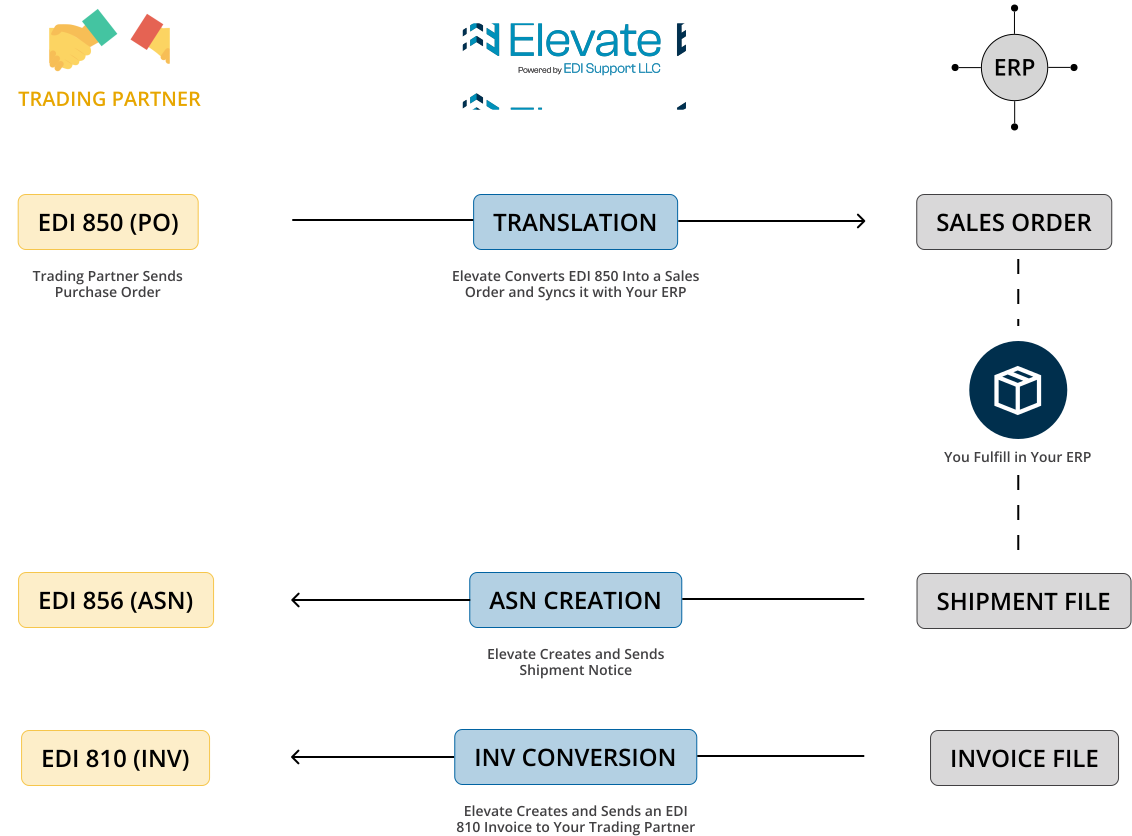
How Does Elevate’s Integrated Solution Work?
Why Integrate Your ERP with Elevate?
Eliminate Manual Order Entry
EDI orders sync into your ERP automatically.
Automatic EDI Document Creation
Orders, shipment notices and invoices created and sent automatically.
Real-Time Visibility
See document status before issues escalate.
Fully-Managed EDI Service + Integration Support
EDI setup, translation, validation, and support- all included.
Reduce Errors and Chargebacks
Catch errors early before they cost you.
Scale Without Adding Staff
Add trading partners without adding resources.
Who Should Use Elevate’s Integrated Solution?
You are a good fit if you:
- Already on Elevate’s Non-Integrated EDI Solution
- Already Run an ERP
- Growing and Need to Manage Multiple Trading Partners
- Are Switching EDI Providers with an ERP in the Background
- Need to Process Significant EDI Volume
Not a fit if you:
- Are brand new to EDI with only one trading partner
- Don’t have an ERP in place yet
- Need a portal-only solution or DIY EDI tool
- Have minimal/seasonal ongoing EDI requirements
If this describes your current setup, Elevate also offers a non-integrated cloud EDI solution developed for simpler use cases.
Not a fit if you:
- Are brand new to EDI with only one trading partner
- Don’t have an ERP in place yet
- Need a portal-only solution or DIY EDI tool
- Have minimal/seasonal ongoing EDI requirements
If this describes your current setup, Elevate also offers a non-integrated cloud EDI solution developed for simpler use cases.
Getting Started with Elevate’s Integrated Solution
Our onboarding process is designed to minimize disruption while getting your first trading partner live quickly.
Assessment
We review your current trading partners’ EDI requirements and ERP setup.
Configuration
We map your EDI data to your ERP fields and set up trading partner connections.
End-to-End Testing
We validate the flow of transactions from Elevate to your ERP and back and further to each of your trading partners before going live.
Go-Live
We begin processing your EDI transactions with ongoing monitoring and support.
Most customers are live with our current integrations and their first trading partner within 3-6 weeks.
Getting Started with Elevate’s Integrated Solution
Our onboarding process is designed to minimize disruption while getting your first trading partner live quickly.
Assessment
We review your current trading partners’ EDI requirements and ERP setup.
Configuration
We map your EDI data to your ERP fields and set up trading partner connections.
End-to-End Testing
We validate the flow of transactions from Elevate to your ERP and back and further to each of your trading partners before going live.
Go-Live
We begin processing your EDI transactions with ongoing monitoring and support.
Most customers are live with our current integrations and their first trading partner within 3-6 weeks.
Frequently Asked Questions
No. Celigo is a software you use to build integrations. Elevate is a cloud EDI platform service that provides an interface to run your EDI transactions and connect with your ERP or any other backend software. We do the work so you don’t have to.
No. Elevate is cloud EDI software that integrates with your ERP via API connections. There’s no software to install or maintain in your ERP system. All EDI translation and processing happens in Elevate’s platform.
Perfect. Unlike Celigo, which often requires a high entry price, Elevate allows you to start with one partner for just $750 as a one-time setup fee and minimum monthly fee and scale only when you’re ready.
Schedule a discovery call with one of our EDI experts to discuss your ERP requirements. We’re actively expanding our integration capabilities and may be able to accommodate your system or add it to our development roadmap.
Elevate uses standard API connections to integrate with your ERP:
– Acumatica: REST API and Contract-Based endpoints
– NetSuite: SuiteTalk (SOAP/REST API)
– Acumen: Flat File Integration
All connections are secure and don’t require installing any software in your ERP.
Yes. Elevate maps EDI data to your specific ERP configuration, including custom fields and workflows. EDI data flows to the correct locations in your system without requiring changes to your ERP setup.
No. Elevate is designed to work with your existing ERP workflows, not replace them. You continue to fulfill orders, ship, and invoice exactly as you do today. Elevate automates the EDI document exchange in the background.
Yes. We conduct thorough end-to-end testing with your trading partners before processing any live transactions. This ensures orders, shipments, and invoices flow correctly between the three systems.
Elevate supports all standard X12 EDI documents including:
– Inbound: 850 (Purchase Orders)
– Outbound: 810 (Invoices), 855 (PO Acknowledgements) 856 (Advanced Ship Notices), 846 (Inventory Updates)
Elevate supports all major retailers, distributors, and 3PLs that use EDI, including Walmart, Target, Amazon Vendor Central, Home Depot, Lowe’s, Wayfair, and hundreds of others. We handle both large enterprise retailers and smaller regional distributors as long as it’s the data that is being moved between systems.
Each trading partner has specific EDI compliance requirements. Elevate validates all outbound EDI documents against each partner’s specific requirements before transmission, catching compliance issues before they result in chargebacks.
Elevate’s support team monitors trading partner requirement changes and updates EDI mappings proactively. You’re notified of changes but don’t need to manage the technical updates yourself.
Adding new trading partners is a configuration process, not development work. Elevate handles the setup, testing, and ongoing communication for each new partner without requiring changes to your ERP.
Elevate provides real-time dashboards showing EDI transaction status. You can see when orders arrive from trading partners, when shipments send, and where exceptions occur before they impact your operations.
Elevate validates all EDI data before creating orders in your ERP and before sending documents to trading partners. If an error is detected, you receive immediate alerts with details about the issue so we can help you correct it before it becomes a problem.
Elevate helps prevent chargebacks by validating all outbound EDI documents against trading partner requirements before transmission. This catches compliance issues (missing data, incorrect formats, timing problems) before they result in costly chargebacks.
Yes. Elevate can process EDI transactions in real-time as they arrive or on a scheduled basis for high-volume operations. The sync timing is configurable based on your business needs.
Elevate handles all EDI translation, validation, and trading partner communication. Our support team monitors your EDI operations, manages trading partner requirement changes, and provides ongoing assistance as your business grows.
Yes. All data transmission between Elevate and your ERP uses secure API connections. All business data remains in your ERP instance. Elevate only stores transaction logs needed for monitoring and troubleshooting.
Elevate maintains compatibility with current ERP versions. When your ERP is updated, we ensure the integration continues to work without disruption.
Yes. Elevate is built to scale with your business. Whether you process 100 or 10,000 EDI transactions monthly, the platform handles growing volume without performance issues.
Yes, Elevate can work with both cloud or on-premise ERP systems as long as the ERP offers a way to connect through APIs or flat files.
Elevate offers a transparent pricing model based on your EDI transaction usage with a one-time ERP integration fee if you choose to connect an ERP. No hidden costs or annual contracts.
No. Elevate does not require any type of contract to be signed. You can scale up or down as your business needs change. We earn your business month by month.
Elevate becomes your external EDI department, providing end-to-end support for your EDI operations and ERP integration.
Our standard SLA is a 2-hour human response (Monday-Friday, 8 AM–5 PM CT) to prevent issues from causing retailer chargebacks or scorecard penalties. We resolve most critical issues within 24 hours. Complex issues involving multiple parties may take 24-48 hours depending on the situation.
This includes proactive monitoring, trading partner requirement updates, and ongoing configuration support as your business grows.